Illuminating the Black Box of AI Traffic

Sitechecker | SEO Analytics | B2B SaaS | GA4 AI traffic | Shipped 2025

THE STORY

Making the invisible visible

Artificial intelligence is reshaping search, but traditional analytics tools treat it as a footnote. SEO professionals knew platforms like ChatGPT and Perplexity were sending visitors, but they had no way to measure or act on that data. Competitors either ignored this traffic entirely or buried it in generic referral buckets. We designed a dedicated reporting module to turn this industry-wide blind spot into a competitive advantage for our users.

Product

Web | B2B SaaS

TIMELINE

2025

MY ROLE

As Product Designer, I owned the end-to-end creation of this analytics module from zero. I conducted the initial competitive research, mapped the highly complex data aggregation logic, defined the information architecture across three report tabs, and delivered a production-ready interface integrated directly with Google Analytics.

SKILLS

Product Strategy, Information Architecture, Data Visualization, Technical Logic Mapping, Data Visualization, System Design, Stakeholder Alignment

IMPACT

Launched a dedicated report that gives SEO professionals exact visibility into LLM-driven traffic. Over 2,300 users adopted the feature within eight weeks of release, and sales teams actively use it as a deciding factor for subscription upgrades.

THE PROBLEM

The five percent guess

Standard analytics platforms saw AI traffic arriving but stubbornly refused to give it a dedicated channel. I ran a parallel research process to understand exactly how SEO professionals were patching these structural blind spots and where the existing market tools fell short.

Users were building custom dashboards because their native tools failed them

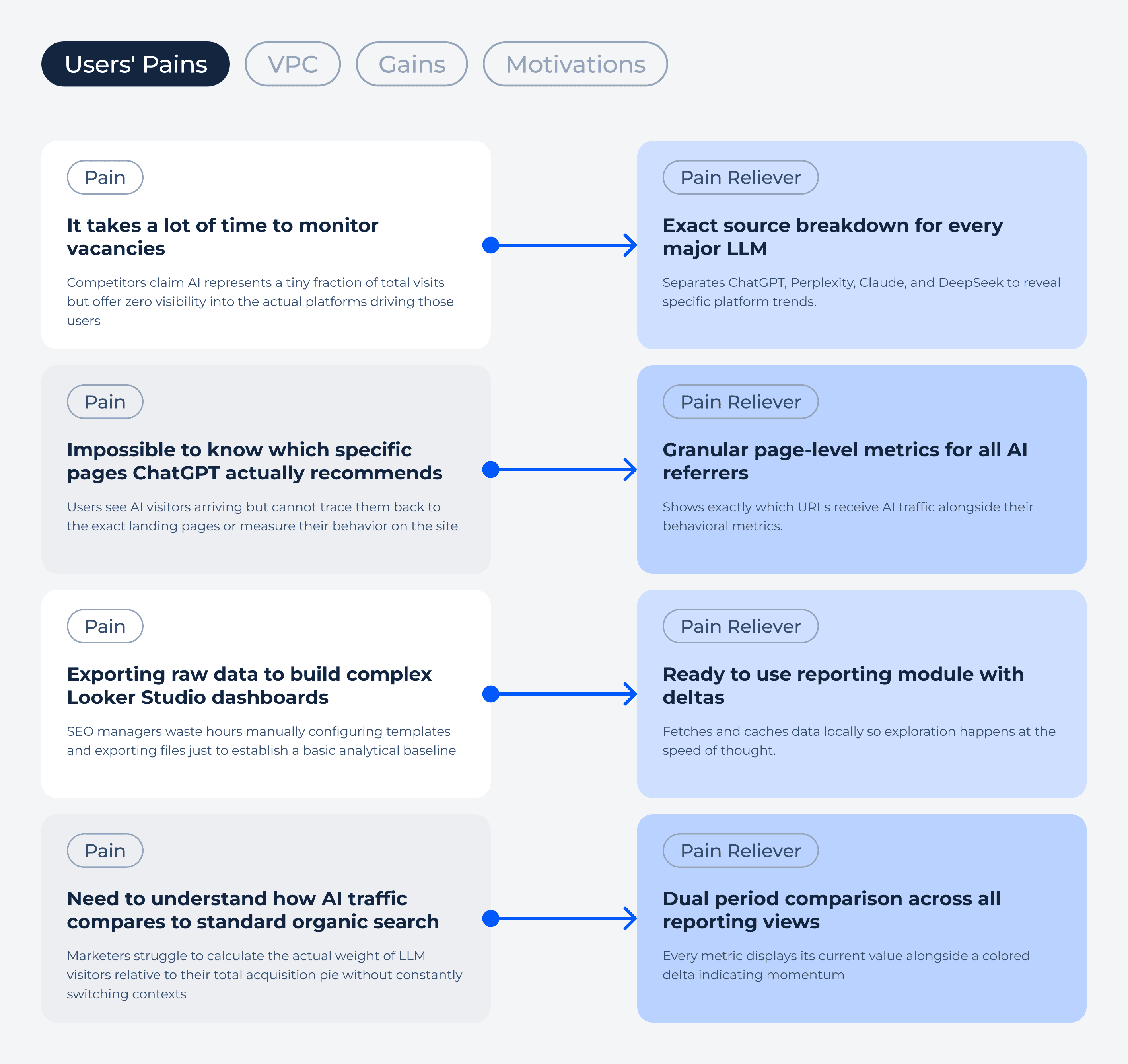
Digging through LinkedIn discussions and SEO Reddit threads revealed a consistent pattern. I used AI tools to scrape and synthesize hundreds of posts into structured insights. Marketers were exhausted by analytical blind spots. They needed to know which specific pages ChatGPT actually recommended and exactly how that volume compared to their standard organic traffic. Native analytics tools technically captured these sessions, but they forced users to write complex regular expressions just to rescue the data from generic referral buckets. To get a readable interface, teams had to connect their properties to external Looker Studio templates or pay for heavy third party SEO suites. The default ecosystem treated AI traffic as a tracking anomaly rather than a primary acquisition channel.
The friction of fragmented tools

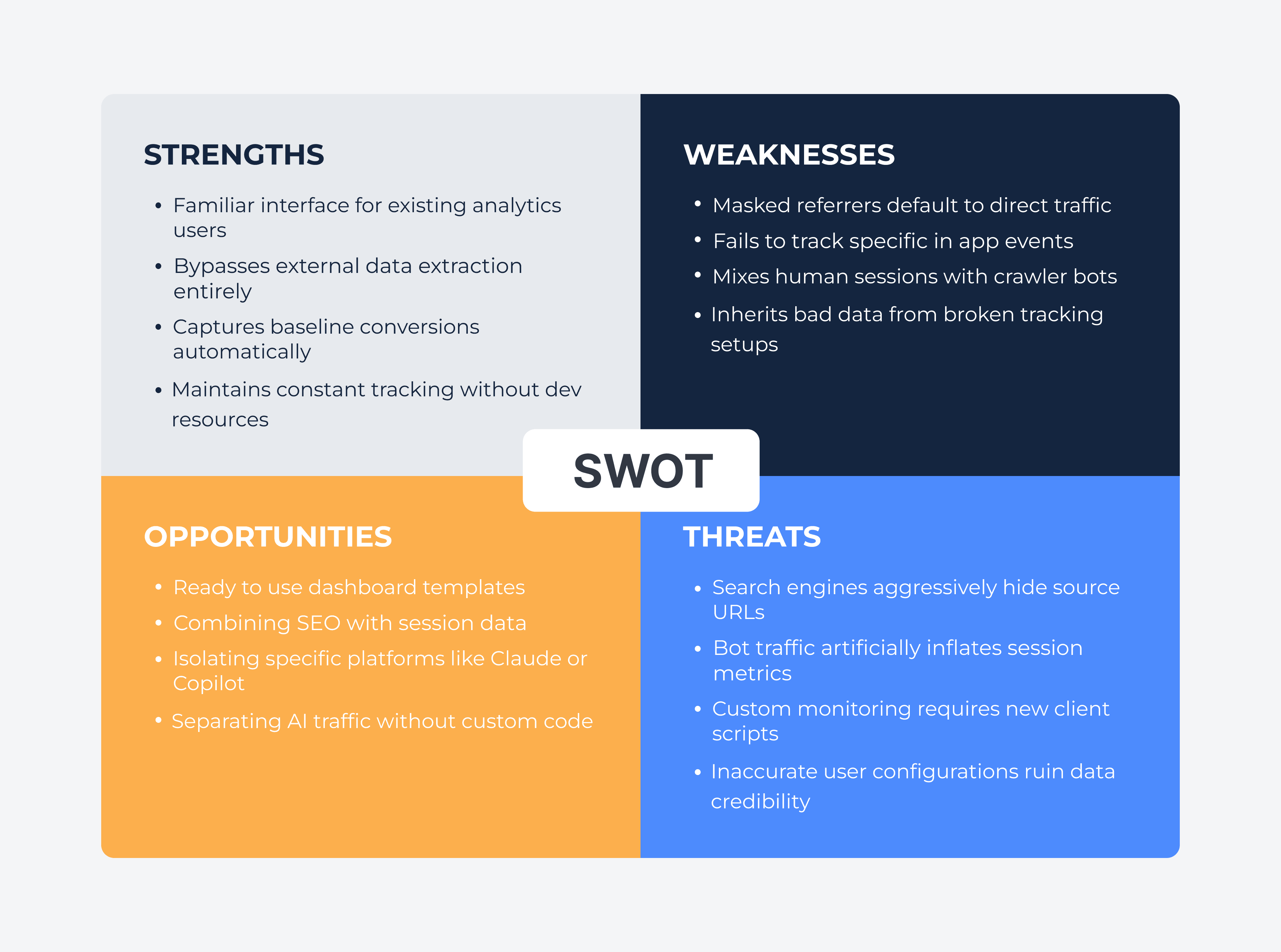
Native analytics platforms completely lack a dedicated AI channel. They force marketers to manually write complex regular expressions just to rescue ChatGPT or Perplexity visits from generic referral buckets. A few third party templates exist to automate this, but they pull users entirely out of their native workflow into rigid Looker Studio files that break the moment you need custom event tracking. Heavy SEO platforms try to bolt AI metrics onto their existing suites, but they merely inherit the limitations of the underlying Google property. Users faced a miserable choice between building fragile manual workarounds or adopting entirely new tracking software just to answer basic questions about their traffic.
THE HYPOTHESIS

Context beats raw numbers
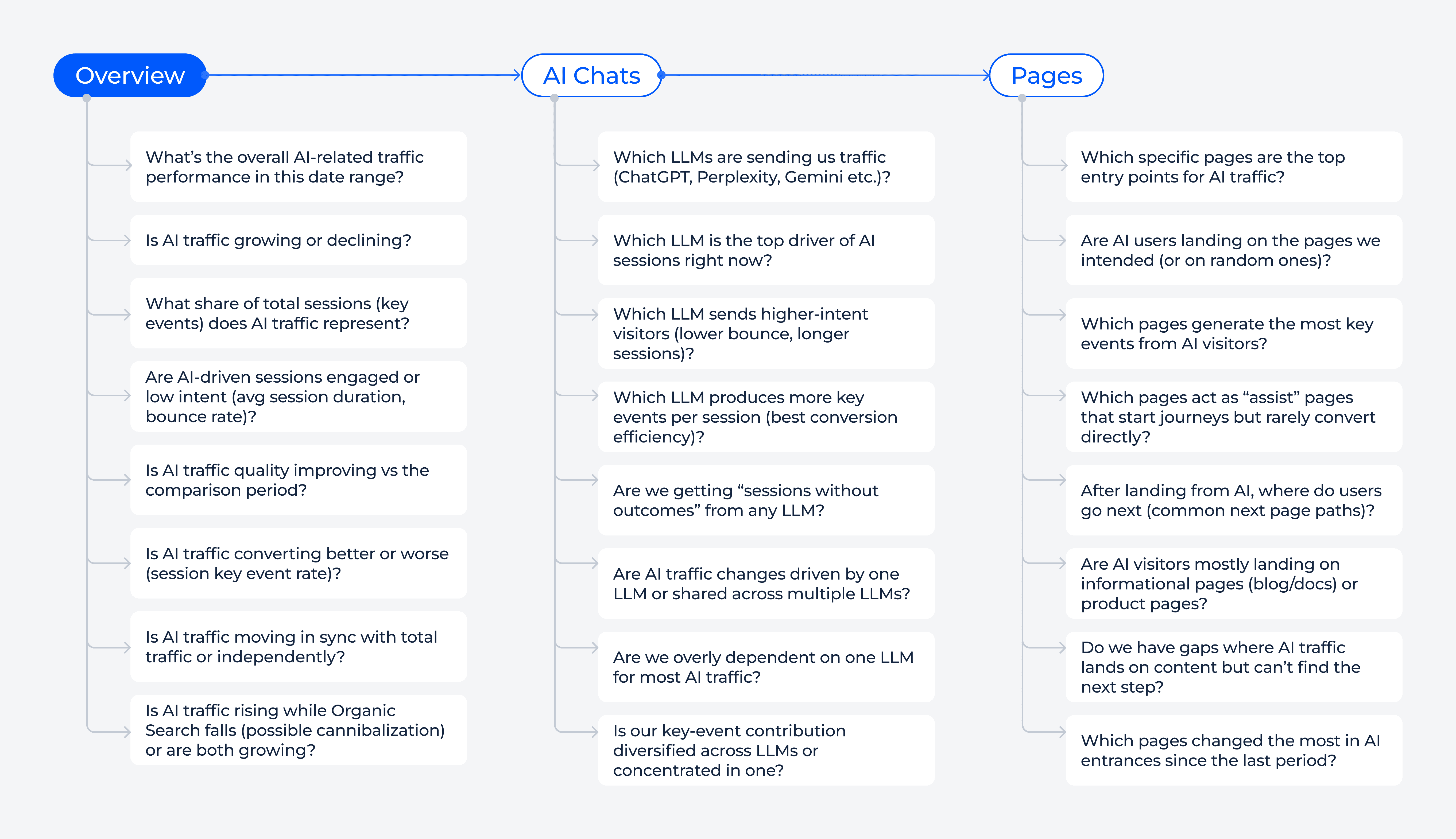
Users did not need more raw data dumped into a spreadsheet. They needed a preconfigured environment structured for immediate decisions. I hypothesized that progressive disclosure across three distinct tabs would completely eliminate the need for custom regex filtering or external dashboards.

This architecture lets users start with high-level channel benchmarks before drilling down into specific URL performance. The flow answers three successive questions naturally. How does this new AI channel compare to standard organic search? Which specific LLM platforms are actually driving the sessions? And exactly which of my landing pages are surviving the AI summarization process?

The goal was measurable and practical:

THE EXECUTION

Structuring Data for Human Decisions

INFORMATION ARCHITECTURE

Three levels of depth

I split the module into exactly three distinct tabs to match the natural mental model of a marketer analyzing traffic. Two tabs felt too shallow, while four fragmented the data unnecessarily.

⇥ The Overview tab answers the immediate baseline question of how AI stacks up against organic search.
⇥ The AI Chats tab answers the source question by separating ChatGPT from Claude or DeepSeek to reveal specific platform trends.
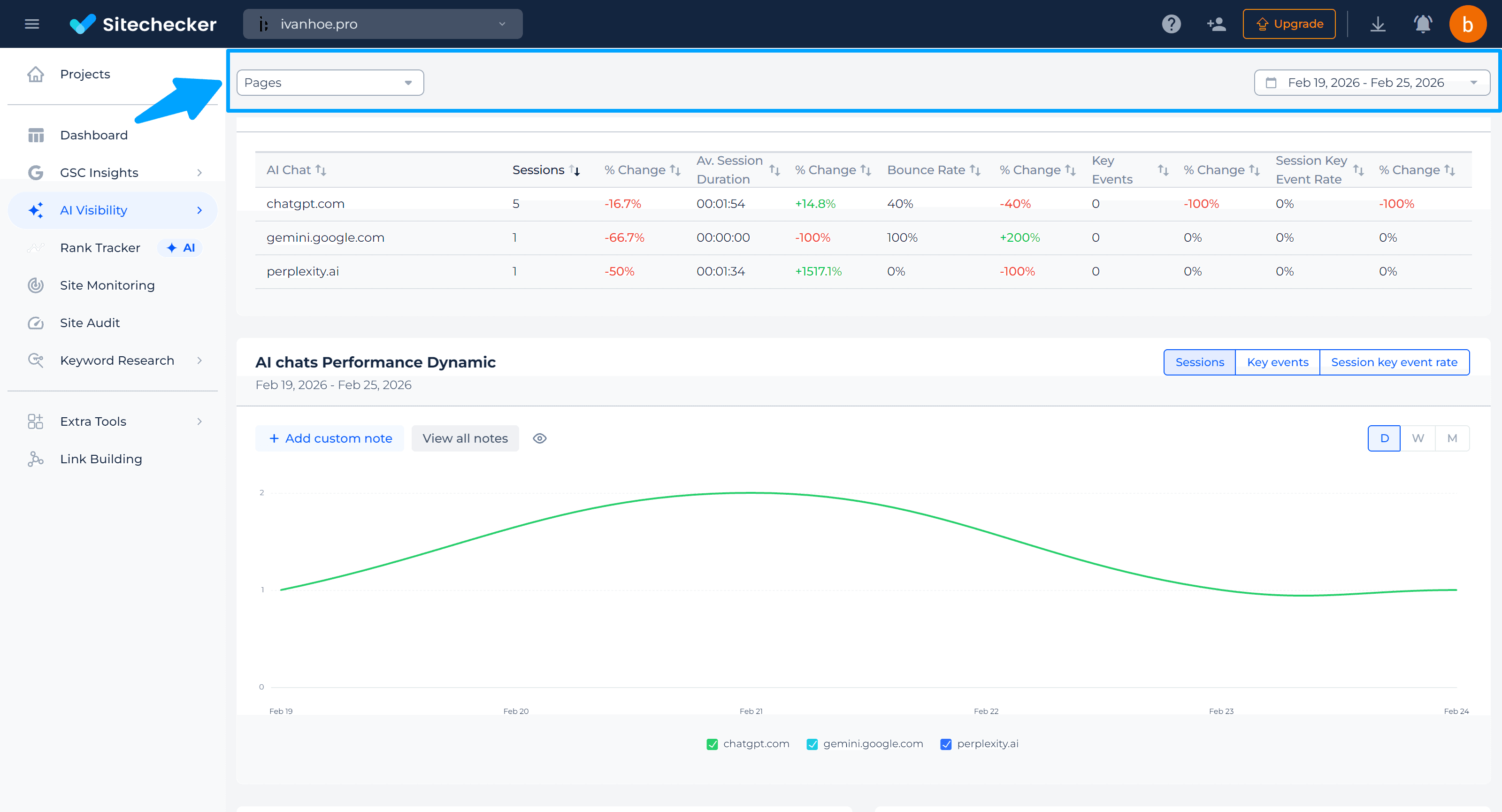
⇥ The Pages tab provides the deepest detail by showing exactly which URLs receive AI traffic alongside their behavioral metrics.

This specific division allows users to move from the what to the who and finally to the where without losing their analytical context.

We started with the foundation: Chart on top, Table below. Familiar territory.

We also treated the chart as more than a visualization. It is where investigation starts. So we added two context layers directly on the timeline: Google updates and custom notes. Users can see algorithm shifts in the same view as their performance changes, and leave their own markers to explain what happened and why.

In native GSC, the answers are still hidden behind clicks. The most common question is: “Which Page ranks for this Keyword?” And answering it costs context.

✨ Why it matters?

✨ Why it matters?

Throwing all available data onto a single screen creates analysis paralysis. Progressive disclosure respects the user's cognitive limits. It gives them a clear starting point and invites them to dig deeper only when they have formed a specific question.

DATA VISUALIZATION

Designing for comparison
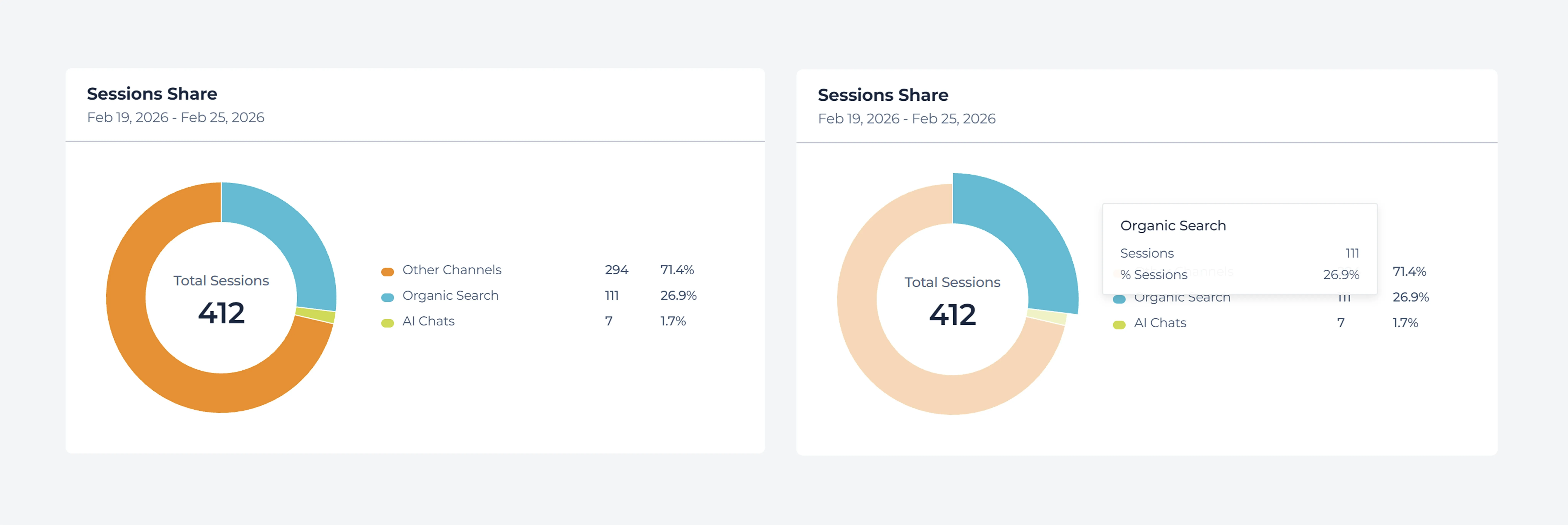
Making complex data immediately digestible requires clear visual anchors.

I chose donut charts over standard bar graphs for the session share widgets because users needed to instantly grasp the exact proportion of AI traffic relative to the whole. A donut chart naturally communicates parts of an ecosystem, forcing the viewer to see AI traffic not just as an isolated number, but as a specific slice of their total acquisition pie.

We started with the foundation: Chart on top, Table below. Familiar territory.

We also treated the chart as more than a visualization. It is where investigation starts. So we added two context layers directly on the timeline: Google updates and custom notes. Users can see algorithm shifts in the same view as their performance changes, and leave their own markers to explain what happened and why.

In native GSC, the answers are still hidden behind clicks. The most common question is: “Which Page ranks for this Keyword?” And answering it costs context.

I locked the date picker and global filter bar to the top of the viewport. Losing context is the biggest friction point in data analysis. When users scroll through a dense table of a hundred landing pages, forcing them to scroll back to the top just to change the date range breaks their concentration.

We started with the foundation: Chart on top, Table below. Familiar territory.

We also treated the chart as more than a visualization. It is where investigation starts. So we added two context layers directly on the timeline: Google updates and custom notes. Users can see algorithm shifts in the same view as their performance changes, and leave their own markers to explain what happened and why.

In native GSC, the answers are still hidden behind clicks. The most common question is: “Which Page ranks for this Keyword?” And answering it costs context.

We valso implemented a dual-period comparison by default. Every metric displays its current value alongside a colored delta indicating momentum versus the previous period.

We started with the foundation: Chart on top, Table below. Familiar territory.

We also treated the chart as more than a visualization. It is where investigation starts. So we added two context layers directly on the timeline: Google updates and custom notes. Users can see algorithm shifts in the same view as their performance changes, and leave their own markers to explain what happened and why.

In native GSC, the answers are still hidden behind clicks. The most common question is: “Which Page ranks for this Keyword?” And answering it costs context.

✨ Why it matters?

✨ Why it matters?

Scrolling through a long table of URLs usually means losing sight of the global filters applied to that data. Freezing the filter bar preserves spatial context. Users always know exactly what segment they are looking at, eliminating the frustrating loop of scrolling up and down just to verify the date range.

SYSTEM LOGIC

Designing around API constraints
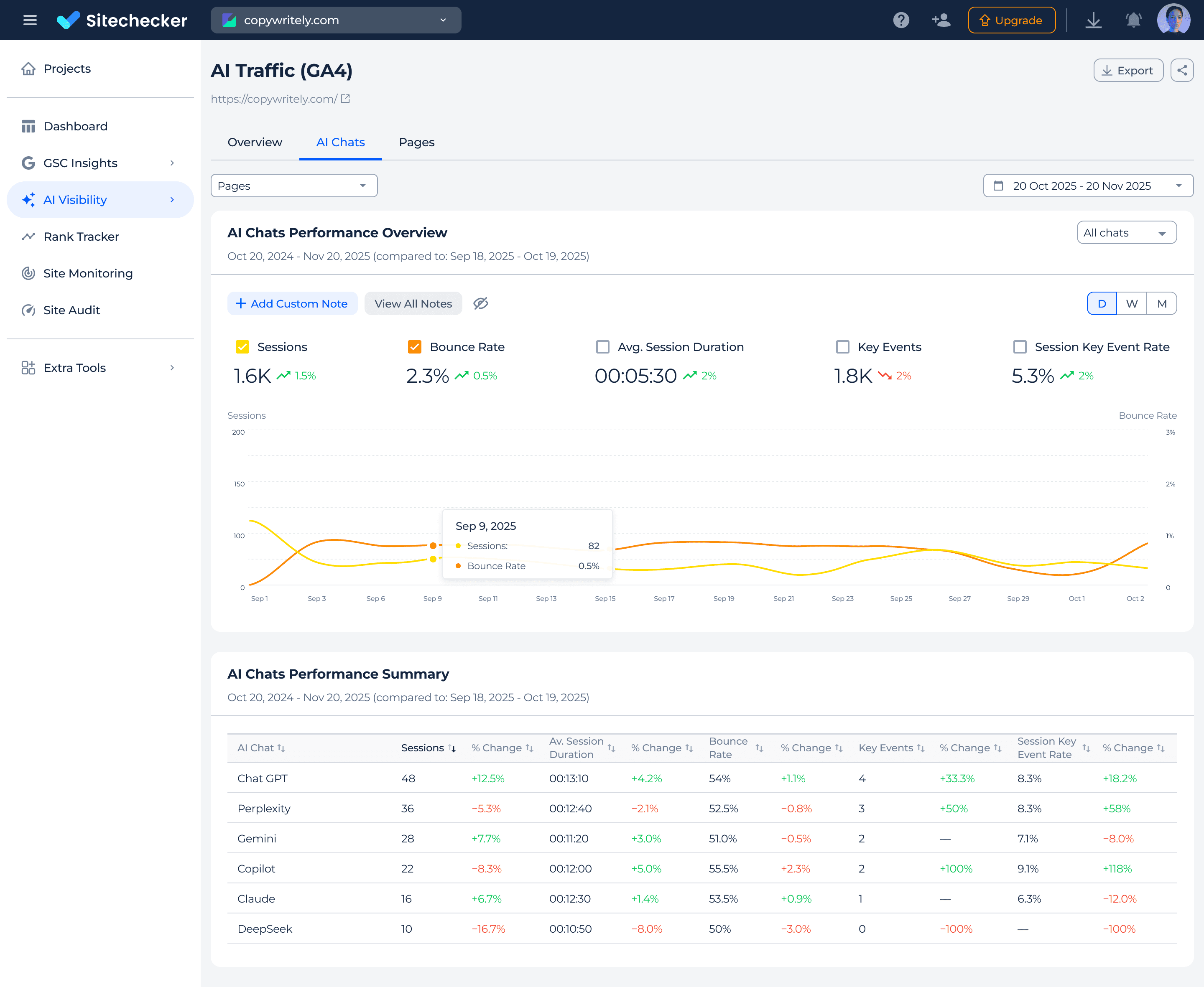
The biggest constraint was not visual but technical. Google Analytics has strict request limits. Making a new server request every time a user clicked a filter or switched a tab would break the tool. Engineering initially proposed a traditional server-side filtering model where every interface interaction fired a new query.

I pushed back against this approach. Constant loading spinners ruin the experience of rapidly comparing different AI platforms. We compromised by shifting the heavy computation entirely to the initial load. We engineered the system to fire exactly three optimized queries right when the dashboard opens. We fetch the overall channel grouping, the specific LLM performance, and the landing page data for both the current and previous date ranges simultaneously. Everything is cached locally so we can calculate complex deltas directly on the client side.

We started with the foundation: Chart on top, Table below. Familiar territory.

We also treated the chart as more than a visualization. It is where investigation starts. So we added two context layers directly on the timeline: Google updates and custom notes. Users can see algorithm shifts in the same view as their performance changes, and leave their own markers to explain what happened and why.

In native GSC, the answers are still hidden behind clicks. The most common question is: “Which Page ranks for this Keyword?” And answering it costs context.

✨ Why it matters?

✨ Why it matters?

Waiting for a loading spinner every time you apply a filter breaks the analytical flow. Fetching everything upfront ensures that data exploration happens at the speed of thought. Users can slice the data instantly, keeping their focus entirely on finding insights rather than waiting for the system to catch up.

OUTCOMES

Measuring impact

Rapid adoption

Over 2,300 users engaged with the report within the first eight weeks of release.

Sustained retention

Approximately 12 percent of active users return to the report weekly. They have successfully integrated AI traffic analysis into their regular workflow.

Post-launch validation

Session recordings revealed users wanted saved filter combinations for daily checks. We prioritized this exact functionality for the immediate next iteration.

Driving business value

Sales managers adopted the feature as a primary proof point during software demos. Multiple users cited AI traffic visibility as their deciding factor for subscription upgrades.

WHAT I LEARNED

Rethinking Best Practices

  1. Research the Gap Rather Than the Feature: Competitors had access to the exact same Google Analytics data, but they failed to present it usefully. The real product opportunity was not inventing new data but building an interface that actually answered the questions SEO professionals were asking.

  1. Constraints Shape Better Architecture: The strict API limits forced a much smarter data fetching strategy. Designing the interface to rely on cached data rather than continuous server requests resulted in a significantly faster and more responsive user experience.

  1. Progressive Disclosure Scales Complexity: Dividing the report into three distinct tabs of increasing depth allows power users to drill down into specific URL performance while keeping the initial view clean and approachable for casual users.

Footer Illustration

You've made it to the end of quite the scroll.. Great job!

In some other universe, we're already friends. So why not in this one? So let's connect!

Serious Me
I'm currently open to full-time opportunities! Let's create something amazing together! ✨
Footer Illustration

You've made it to the end of quite the scroll.. Great job!

In some other universe, we're already friends. So why not in this one? So let's connect!

Serious Me
I'm currently open to full-time opportunities! Let's create something amazing together! ✨